GROMACS
Description

GROMACS is a versatile package to perform molecular dynamics for systems with hundreds to millions of particles. It is primarily designed for biochemical molecules like proteins, lipids and nucleic acids that have a lot of complicated bonded interactions, but since GROMACS is extremely fast at calculating the nonbonded interactions it can also be used for dynamics of non-biological systems, such as polymers and fluid dynamics.
User guide
Available Versions
The following versions of GROMACS are currently available:
- Spúšťacie závislosti:
- Žiadne, požadované knižnice a závislosti sa načítajú automaticky spolu s modulom
GROMACS/2024.4-foss-2023b-CUDA-12.4.0.
- Žiadne, požadované knižnice a závislosti sa načítajú automaticky spolu s modulom
Modul GROMACS môžete načítať pomocou nasledujúceho príkazu:
module load GROMACS/2024.4-foss-2023b-CUDA-12.4.0
- Spúšťacie závislosti:
- Žiadne, požadované knižnice a závislosti sa načítajú automaticky spolu s modulom
GROMACS/2025.2-foss-2025a.
- Žiadne, požadované knižnice a závislosti sa načítajú automaticky spolu s modulom
Modul GROMACS môžete načítať pomocou nasledujúceho príkazu:
module load GROMACS/2025.2-foss-2025a
- Spúšťacie závislosti:
- Žiadne, požadované knižnice a závislosti sa načítajú automaticky spolu s modulom
GROMACS/2025.2-foss-2025b-CUDA-12.9.1.
- Žiadne, požadované knižnice a závislosti sa načítajú automaticky spolu s modulom
CUDA (GPU) build použitý v GPU príklade spúšťacieho skriptu.
Modul GROMACS môžete načítať pomocou nasledujúceho príkazu:
module load GROMACS/2025.2-foss-2025b-CUDA-12.9.1
Benchmarking GROMACS
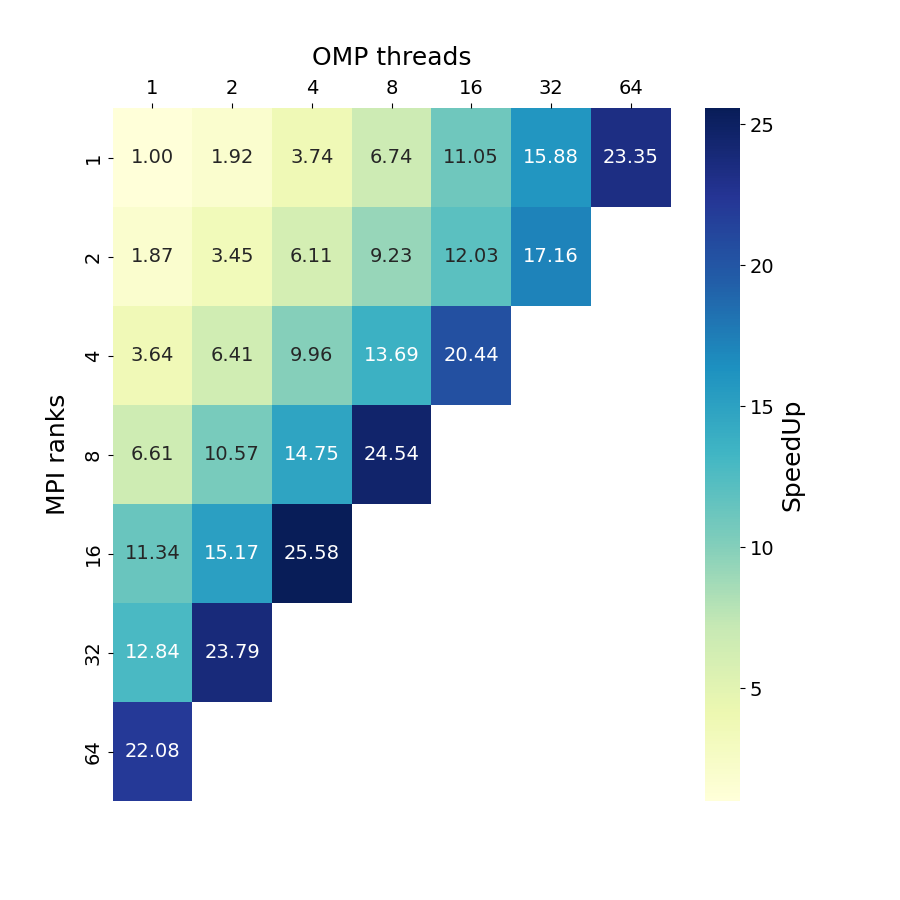
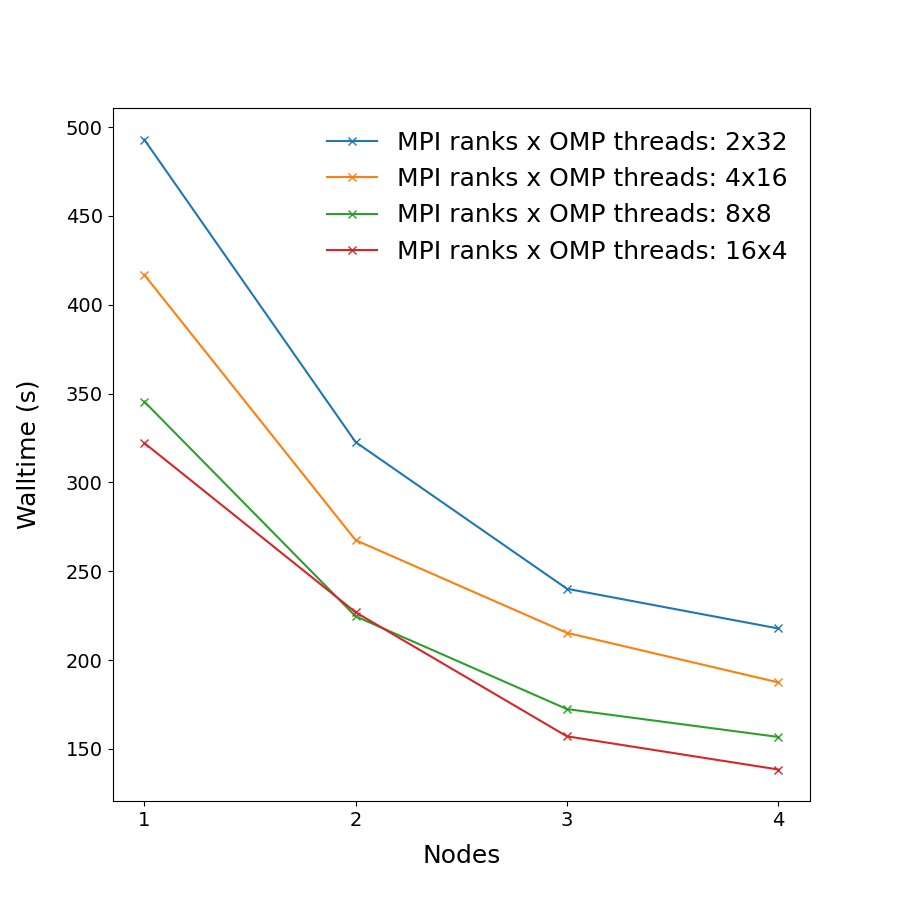
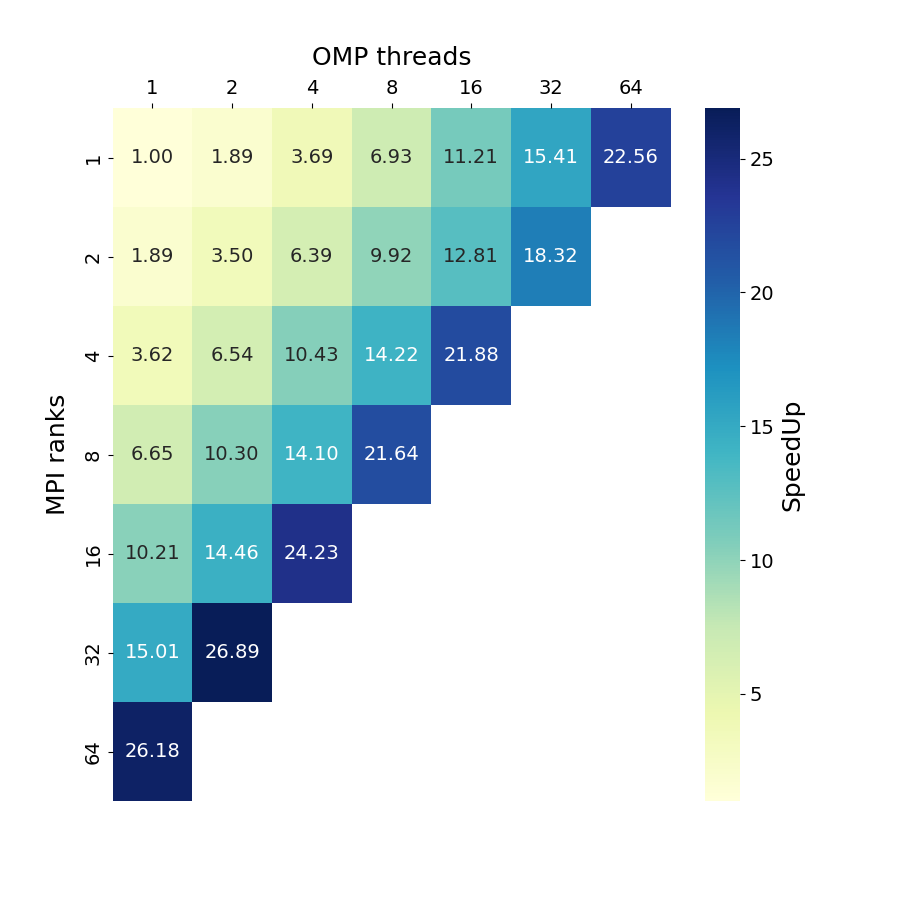
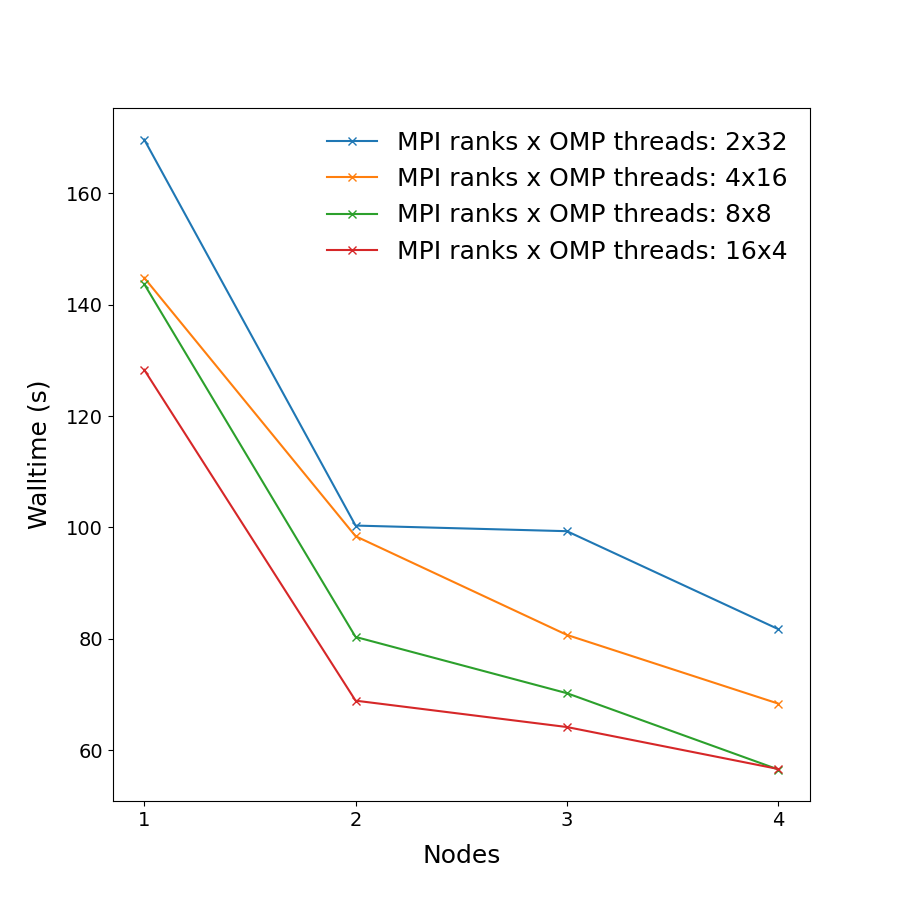
In order to better understand how GROMACS utilizes the available hardware on Devana and how to get good performance we can examine the effect on benchmark performance of the choice of the number of MPI ranks per node and OpenMP threads.
The following command has been used to run the benchmarks:
mpiexec -np "${SLURM_NTASKS}" gmx_mpi mdrun -v -s "${trajectory}.tpr" -ntomp "${SLURM_CPUS_PER_TASK}" -pin on -nsteps 20000 -deffnm "${trajectory}"
For more information about these benchmark systems see the following page.
Info
Single-node benchmarks have been run on local /work/ storage native to each compute node, which is generally faster than shared storage hosting the /project/ and /scratch/ directories.
Benchmarks have been made on the following systems:
Molecular dynamics simulation of protein in membrane surrounded by water molecules (81743 atoms with system size 10.8 x 10.2 x 9.6 Å3) with a 2fs time step for a total of 40ps. Downloadable here.
| Single-node Performance | Cross-node Performance |
|---|---|
 |
 |
Binding affinity study benchmark of protein-ligand system surrounded by water molecules (ca. 107k atoms) with energy evaluations done every step (TI). Downloadable here.
| Single-node Performance | Cross-node Performance |
|---|---|
 |
 |
Binding affinity study benchmark of bromosporine to bromodomain surrounded by water molecules (43952 atoms with system size 8.55 x 8.55 x 6.04 Å3) with a 2fs time step for a total of 400ps. Free energy is controlled with init-lambda-state, coul-lambdas and vdw-lambdas vectors, all 20 lambda states are calculated, energy evaluations done every step. Downloadable here.
| Single-node Performance | Cross-node Performance |
|---|---|
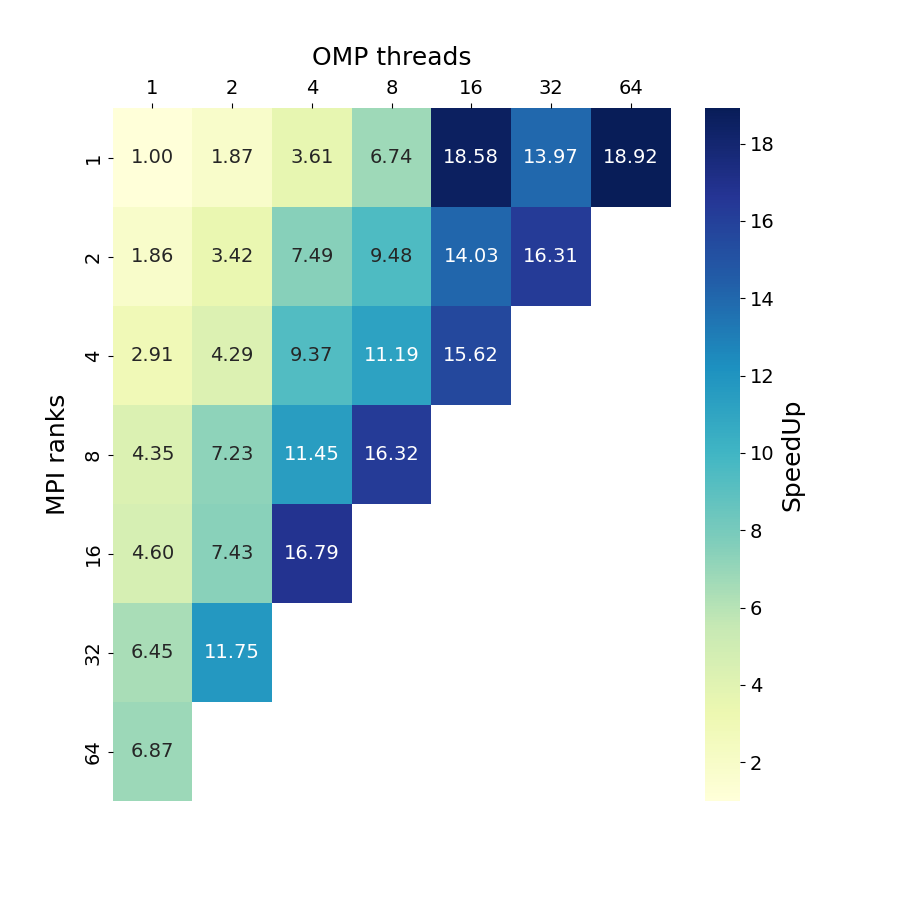 |
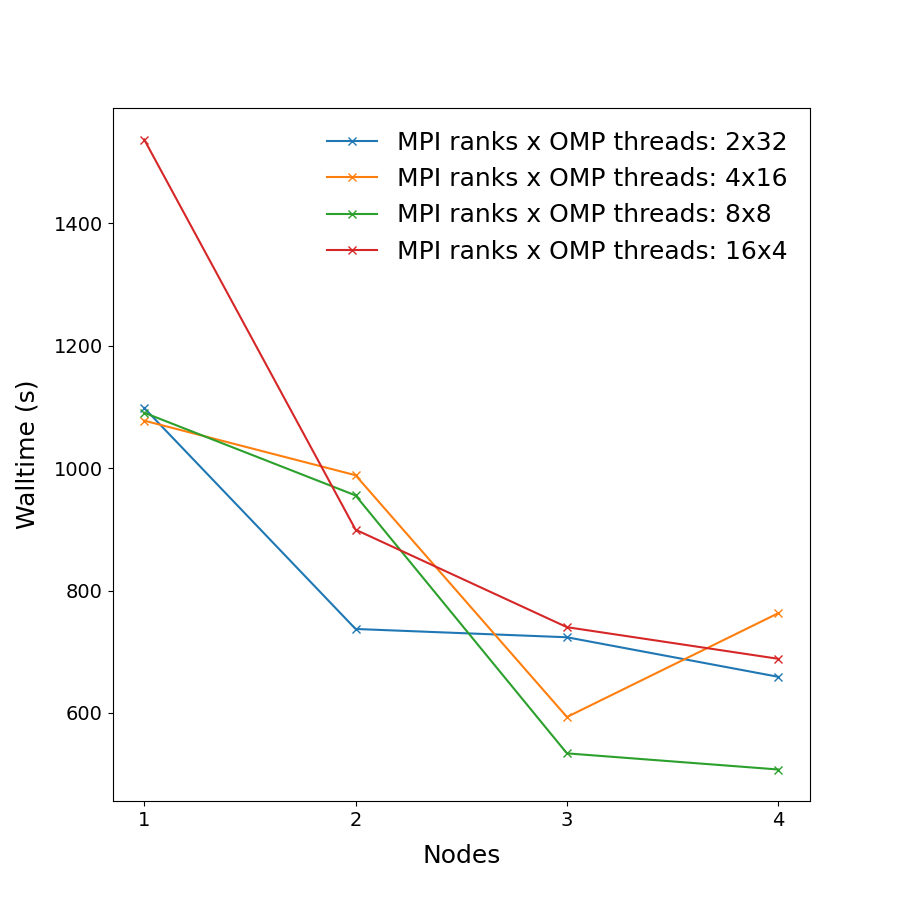 |
Hybrid Decomposition and Node Utilization
The choice of MPI × OpenMP hybrid decomposition has a significant impact on performance. In the benchmark heatmaps, diagonals represent configurations with an equal total number of hardware threads (or Baseline Units, BUs); for example, the outermost diagonal corresponds to 64 BUs, the next to 32 BUs, and so on.
Example run script
CPU Version
You can copy and modify this script to gromacs_run.sh and submit a job to a compute node by the command sbatch gromacs_run.sh.
#!/bin/bash
#SBATCH --job-name=                     # Name of the job
#SBATCH --account=                      # Project account number
#SBATCH --partition=                    # Partition name (short, medium, long)
#SBATCH --nodes=                        # Number of nodes
#SBATCH --ntasks=                       # Total number of MPI ranks
#SBATCH --cpus-per-task=                # Number of threads per MPI rank
#SBATCH --time=hh:mm:ss                 # Time limit (hh:mm:ss)
#SBATCH --output=stdout.%j.out          # Standard output (%j = Job ID)
#SBATCH --error=stderr.%j.err           # Standard error
#SBATCH --mail-type=END,FAIL            # Notifications for job done or failed
#SBATCH --mail-user=                    # Email address for notifications

# === Metadata functions ===
log_job_start() {
    echo "================== SLURM JOB METADATA =================="
    printf " Job ID        : %s\n" "$SLURM_JOB_ID"
    printf " Job Name      : %s\n" "$SLURM_JOB_NAME"
    printf " Partition     : %s\n" "$SLURM_JOB_PARTITION"
    printf " Nodes         : %s\n" "$SLURM_JOB_NUM_NODES"
    printf " Tasks (MPI)   : %s\n" "$SLURM_NTASKS"
    printf " CPUs per Task : %s\n" "$SLURM_CPUS_PER_TASK"
    printf " Account       : %s\n" "$SLURM_JOB_ACCOUNT"
    printf " Submit Dir    : %s\n" "$SLURM_SUBMIT_DIR"
    printf " Work Dir      : %s\n" "$PWD"
    printf " Start Time    : %s\n" "$(date)"
    echo "========================================================"
}

log_job_end() {
    printf " End Time      : %s\n" "$(date)"
    echo "========================================================"
}

# === Load required module(s) ===
module purge
module load GROMACS/2024.4-foss-2023b-CUDA-12.4.0

# === Set working directories ===
# Use shared filesystems for cross-node calculations
INIT_DIR="${SLURM_SUBMIT_DIR}"
WORK_DIR="/project/${SLURM_JOB_ACCOUNT}/${SLURM_JOB_ID}"
mkdir -p "$WORK_DIR"

# === Input/output file declarations ===
INPUT_FILES=""                          # Adjust as needed
OUTPUT_FILES=""                         # Adjust as needed

# === Copy input files to scratch ===
cp $INPUT_FILES "$WORK_DIR"

# === Change to working directory ===
cd "$WORK_DIR" || { echo "Failed to cd into $WORK_DIR"; exit 1; }

log_job_start >> "$INIT_DIR/jobinfo.$SLURM_JOB_ID.log"

# === Run GROMACS ===
mpiexec -np ${SLURM_NTASKS} gmx mdrun -ntomp ${SLURM_CPUS_PER_TASK} ...

# === Copy output files back ===
cp $OUTPUT_FILES "$INIT_DIR"

# === Optional: clean up scratch ===
# rm -rf "$WORK_DIR"

log_job_end >> "$INIT_DIR/jobinfo.$SLURM_JOB_ID.log"
GPU Accelerated Version
GPU support is available in the GROMACS/2024.4 module on Devana.
You can copy and modify this script to gromacs_run_gpu.sh and submit a job to a compute node by the command sbatch gromacs_run_gpu.sh.
#!/bin/bash
#SBATCH --job-name=                     # Name of the job
#SBATCH --account=                      # Project account number
#SBATCH --partition=gpu                 # GPU-enabled partition
#SBATCH --nodes=                        # Number of nodes
#SBATCH --ntasks=                       # Total number of MPI ranks
#SBATCH --cpus-per-task=                # Number of threads per MPI rank
#SBATCH --gres=gpu:1                    # Request 1 GPU
#SBATCH --time=hh:mm:ss                 # Time limit (hh:mm:ss)
#SBATCH --output=stdout.%j.out          # Standard output (%j = Job ID)
#SBATCH --error=stderr.%j.err           # Standard error
#SBATCH --mail-type=END,FAIL            # Notifications for job done or failed
#SBATCH --mail-user=                    # Email address for notifications

# === Metadata functions ===
log_job_start() {
    echo "================== SLURM JOB METADATA =================="
    printf " Job ID        : %s\n" "$SLURM_JOB_ID"
    printf " Job Name      : %s\n" "$SLURM_JOB_NAME"
    printf " Partition     : %s\n" "$SLURM_JOB_PARTITION"
    printf " Nodes         : %s\n" "$SLURM_JOB_NUM_NODES"
    printf " Tasks (MPI)   : %s\n" "$SLURM_NTASKS"
    printf " CPUs per Task : %s\n" "$SLURM_CPUS_PER_TASK"
    printf " GPU Count     : %s\n" "$SLURM_JOB_NUM_GPUS"
    printf " Account       : %s\n" "$SLURM_JOB_ACCOUNT"
    printf " Submit Dir    : %s\n" "$SLURM_SUBMIT_DIR"
    printf " Work Dir      : %s\n" "$PWD"
    printf " Start Time    : %s\n" "$(date)"
    echo "========================================================"
}

log_job_end() {
    printf " End Time      : %s\n" "$(date)"
    echo "========================================================"
}

# === Load required module(s) ===
module purge
module load GROMACS/2023.2-intelmkl-CUDA-12.0

# === Set working directories ===
# Use shared filesystems for cross-node calculations
INIT_DIR="${SLURM_SUBMIT_DIR}"
WORK_DIR="/scratch/${SLURM_JOB_ACCOUNT}/${SLURM_JOB_ID}"
mkdir -p "$WORK_DIR"

# === Input/output file declarations ===
INPUT_FILES=""                          # Adjust as needed
OUTPUT_FILES=""                         # Adjust as needed

# === Copy input files to scratch ===
cp $INPUT_FILES "$WORK_DIR"

# === Change to working directory ===
cd "$WORK_DIR" || { echo "Failed to cd into $WORK_DIR"; exit 1; }

log_job_start >> "$INIT_DIR/jobinfo.$SLURM_JOB_ID.log"

# === Run GROMACS ===
mpiexec -np ${SLURM_NTASKS} gmx mdrun -ntomp ${SLURM_CPUS_PER_TASK} -nb gpu ...

# === Copy output files back ===
cp $OUTPUT_FILES "$INIT_DIR"

# === Optional: clean up scratch ===
# rm -rf "$WORK_DIR"

log_job_end >> "$INIT_DIR/jobinfo.$SLURM_JOB_ID.log"
The script offloads the short-range nonbonded interactions to the GPU using
-nb gpu, which provides most of the speedup compared to CPU-only runs.
You can also offload:
- PME calculations:
-pme gpu - Bonded interactions:
-bonded gpu
See the GROMACS GPU performance guide for more details.
GPU assignment
Manually assigning tasks to specific GPUs is not currently supported. The number of MPI ranks determines the number of GPU tasks spawned, which are evenly distributed across available GPUs.