OpenMolcas
Description
OpenMolcas is a quantum chemistry software package developed by scientists and intended to be used by scientists. It includes programs to apply many different electronic structure methods to chemical systems, but its key feature is the multiconfigurational approach, with methods like CASSCF and CASPT2. OpenMolcas is not a fork or reimplementation of Molcas, it is a large part of the Molcas codebase that has been released as free and open-source software (FOSS) under the Lesser General Public License (LGPL) version 2.1. Some parts of Molcas remain under a different license by decision of their authors (or impossibility to reach them), and are therefore not included in OpenMolcas.
User guide
You can find the software documentation and user guide on the official OpenMolcas website.
Available Versions
The following versions of OpenMolcas are currently available:
- Runtime dependencies:
- None, required libraries and dependencies are loaded automatically with the
OpenMolcas/24.10-intel-2023amodule.
- None, required libraries and dependencies are loaded automatically with the
You can load the OpenMolcas module with the following command:
module load OpenMolcas/24.10-intel-2023a
Benchmarking OpenMolcas
OpenMolcas Parallelization
It is important to note that not all Molcas modules can benefit from parallel execution. This means that even though the calculation will get executed in parallel, all processes will perform the same serial calculation. This means that the benchmarks consisting of multiple modules do not gain the benefit of multiple MPI ranks throughout the full run. For a list of parallelized Molcas modules see Parallelization efforts in the Molcas manual.
Warning
The list of parallel modules is incomplete, as illustrated by the COOH dimer benchmark with parallel execution of the CHCC module, and the user is advised to test the availability of parallel calculation on smaller systems, and/or inspect the specific modules in the OpenMolcas manual for any information about parallel calculations.
In order to better understand how OpenMolcas utilises the available hardware on Devana and how to get good performance we can examine the effect on benchmark performance of the choice of the number of MPI ranks per node and OpenMP thread.
The following command has been used to run the benchmarks:
    export MOLCAS_WORKDIR=/scratch
    export MOLCAS_MEM=$mem
    pymolcas $molecule.inp -np $ntmpi -nt $ntomp -o $molecule.out
where variables ntmpi and ntomp represent number of MPI ranks and OMP threads, respectively.
The variables $molecule, $ntmpi, $ntomp and $mem are placeholders. Variable mem,
representing the maximum allocatable memory per MPI rank, was defined as
mem=$(echo "scale=0; $SLURM_MEM_PER_NODE / $SLURM_NTASKS" | bc).
The temporary working MOLCAS_WORKDIR directory was set to /scratch.
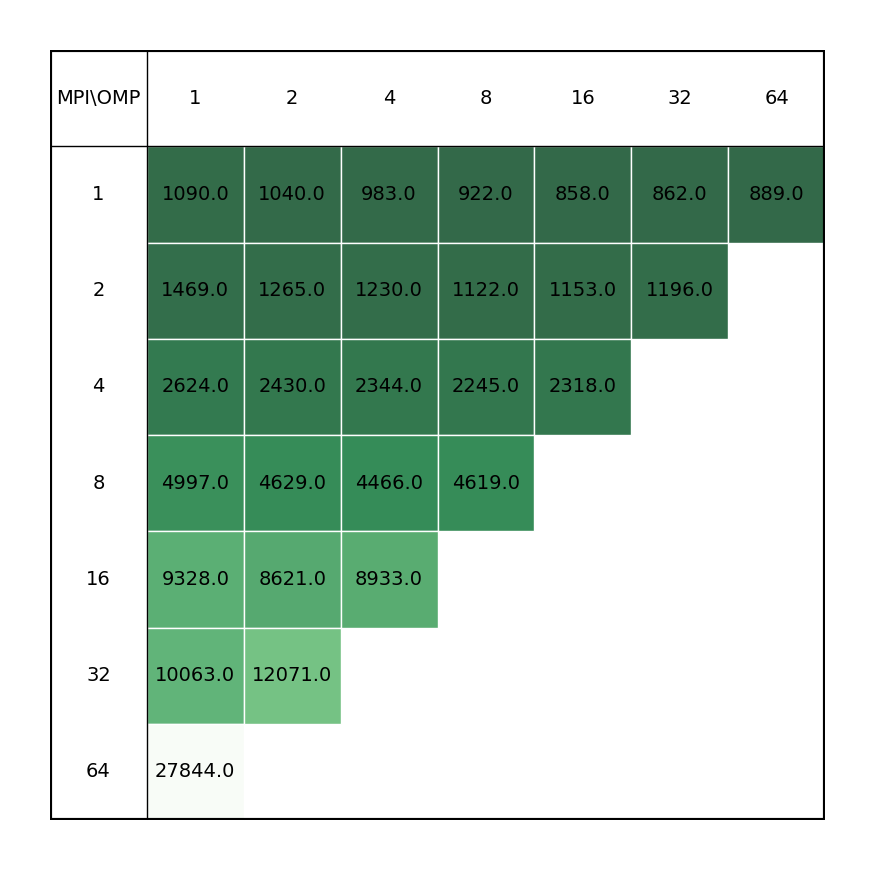
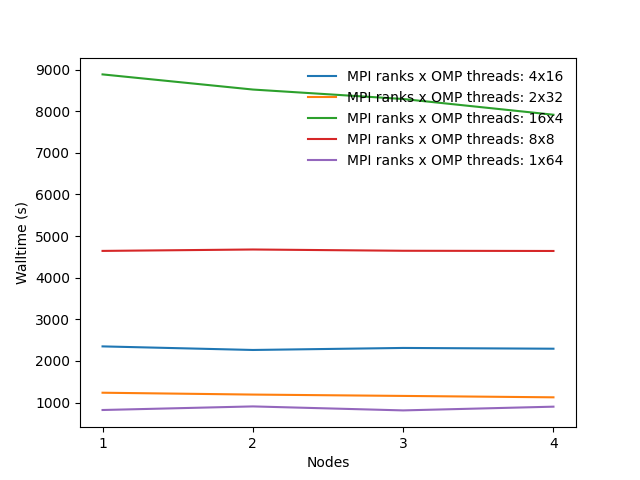
Benchmarks have been made on the following systems:
The following file was used as the input file for this benchmark:
C2Au2.inp
```bash
&SEWARD
Title= C2Au2
Symmetry = X  Y  Z
Basis set
C.ano-rcc-vtzp
C1               0.000000        0.000000        0.614833  Angstrom
End of basis

Basis set
Au.ano-rcc-vtzp
AU1              0.000000        0.000000        2.475008  Angstrom
End of basis
End of input

********************************************
&SCF
Title
   C2Au2
Occupied
   20 10 10 4 19 9 9 4
Iterations
   70
Prorbitals
   2 1.d+10
End of input

*****************************************
&RASSCF &END
Title
   C2Au2
Symmetry
   1
Spin
   1
nActEl
   2 0 0
Inactive
   20  9 10  4 19  9  9  4
Ras2
   0  1  0  0  0  0  0  0
Lumorb
ITERation
   200 50
CIMX
   200
PROR
   100 0
THRS
   1.0d-09 1.0d-05 1.0d-05
OutOrbitals
Canonical
End of input

****************************************
&MOTRA &END
JOBIph
Frozen
   15 7 7 3 15 7 7 3
End of Input

****************************************
&CCSDT &End
Title
   C2Au2 CC
CCT
ADAPtations
   1
Denominators
   2
T3DEnominators
   0
TRIPles
   3
Extrapolation
   6,4
End of input
```
Note that only SEWARD, SCF, RASSCF modules are effectively parallelized in Molcas
and not the coupled-cluster part of the calculation.
| Single node Performance | Cross-node Performance |
|---|---|
 |
 |
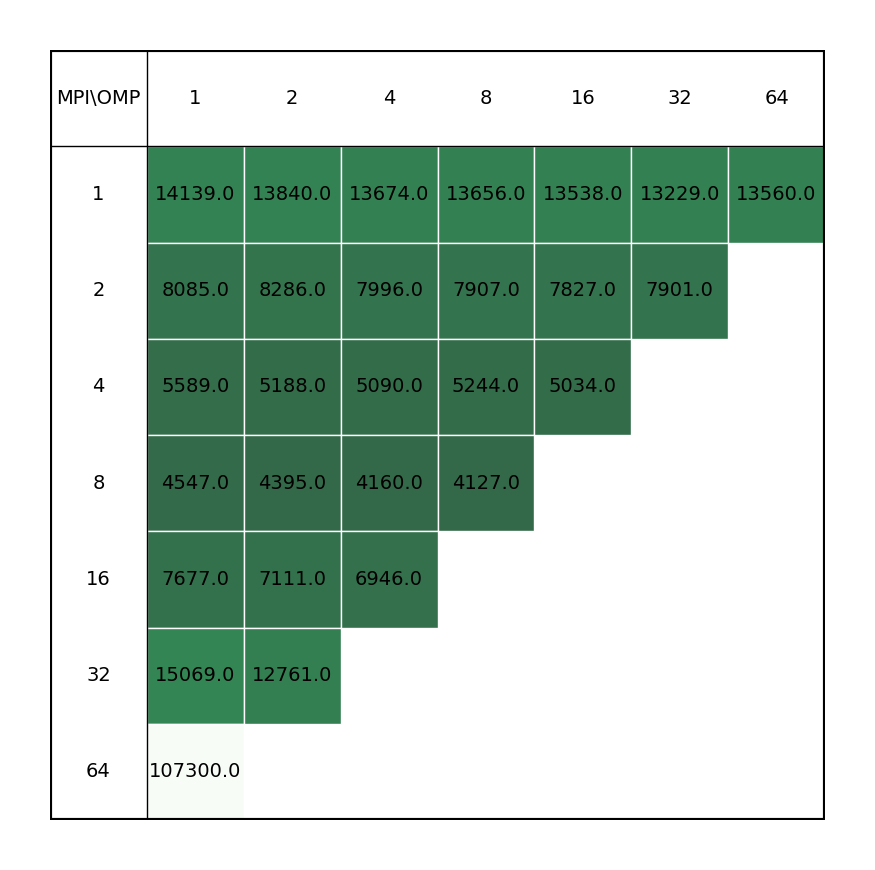
COOH dimer
The following file was used as the input file for this benchmark:
COOH.inp
```bash
&SEWARD
Title=COOH_dim
Cholesky
ChoInput
Thrc
   0.00000001
EndChoInput

Basis set
C.cc-pvtz
C1 -1.888896  -0.179692   0.000000 Angstrom
C2  1.888896   0.179692   0.000000 Angstrom
End of basis
Basis set
O.cc-pvtz
O1 -1.493280   1.073689   0.000000 Angstrom
O2 -1.170435  -1.166590   0.000000 Angstrom
O3  1.493280  -1.073689   0.000000 Angstrom
O4  1.170435   1.166590   0.000000 Angstrom
End of basis
Basis set
H.cc-pvtz
H1  2.979488   0.258829   0.000000 Angstrom
H2  0.498833  -1.107195   0.000000 Angstrom
H3 -2.979488  -0.258829   0.000000 Angstrom
H4 -0.498833   1.107195   0.000000 Angstrom
End of basis
End of input

****************************************
&SCF
Title
   COOH_dim
Occupied
   24
Iterations
   70
Prorbitals
       2 1.d+10
End of input

****************************************
    &CHCC &END
    Title
       CC part
    Frozen
       6
    THRE
       1.0d-08
End of input

****************************************
    &CHT3 &END
    Title
       CC+T3 part
    Frozen
       6
    End of input
```
Note that according to the User Guide only the SEWARD, SCF, and RASSCF modules are effectively parallelized in Molcas; the rest of the calculation is unable to profit from the parallel implementation. This was found to be inaccurate during the benchmark, as even the CHCC module was able to benefit from parallel calculation.
| Single node Performance | Cross-node Performance |
|---|---|
 |
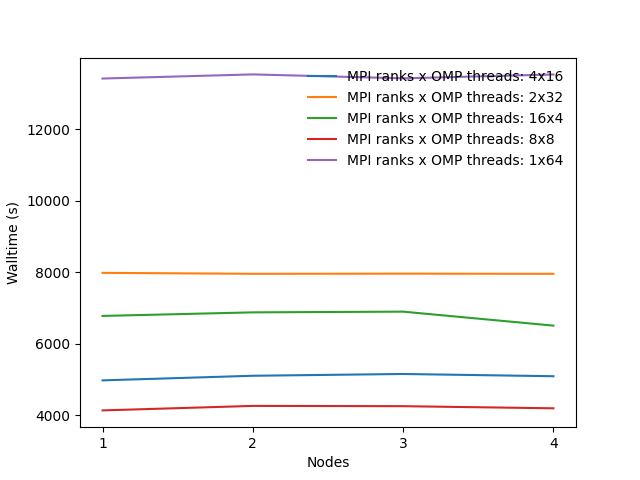 |
Users are not advised to run OpenMolcas in parallel, unless their calculation is solely
based on modules that can benefit from the parallelization scheme, or the non-parallelized
part is inconsequential when compared to the parallel modules. Inclusion of MPI
parallelization in calculations containing a significant part of non-parallelized modules
leads to a loss of performance, possibly due to lesser available memory for each process
(even for non-parallelized modules), which overshadows the gains from the parallelized parts
of the calculation. Improved performance can be achieved by increasing the OpenMP threads
for the process, the -nt keyword in the OpenMolcas command line.
Example run script
You can copy and modify this script as openmolcas_run.sh and submit a job to a compute node with the command sbatch openmolcas_run.sh.
#!/bin/bash
#SBATCH -J "openmolcas_job"    # name of job in SLURM
#SBATCH --partition=            # selected partition (short, medium, long)
#SBATCH --nodes=         # number of used nodes
#SBATCH --ntasks=        # number of mpi tasks (parallel run)
#SBATCH --cpus-per-task= # number of OMP threads per MPI rank
#SBATCH --time=hh:mm:ss         # time limit for a job (max 1-00:00 short, 2-00:00 medium, 4-00:00 long)
#SBATCH -o stdout.%J.out # standard output
#SBATCH -e stderr.%J.out # error output

# Load modules
module load OpenMolcas/24.10-intel-2023a

# Create working directory for OpenMolcas
SCRATCH=/scratch/$SLURM_JOB_ACCOUNT/$SLURM_JOB_ID
mkdir -p $SCRATCH

# Define memory per MPI rank
MEM=             # One MPI rank on a single core corresponds to a maximum of 3.9 GB

# Export variables to OpenMolcas
export MOLCAS_WORKDIR=$SCRATCH
export MOLCAS_MEM=$MEM

INPUT=molcas_input.inp
OUTPUT=molcas_output.out

pymolcas $INPUT -np $SLURM_NTASKS -nt $SLURM_CPUS_PER_TASK -o $OUTPUT