NAMD
Description
NAMD is molecular dynamics simulation software using the Charm++ parallel programming model. It is noted for its parallel efficiency and is often used to simulate large systems (millions of atoms), developed by the collaboration of the Theoretical and Computational Biophysics Group (TCB) and the Parallel Programming Laboratory (PPL) at the University of Illinois at Urbana–Champaign.
User guide
You can find the software documentation on the official NAMD website and the user guide in the NAMD 2.14 user guide.
Available Versions
The following versions of NAMD are currently available:
- Runtime dependencies:
- None, required libraries and dependencies are loaded automatically with the
NAMD/2.14-foss-2021a-CUDA-11.3.1module.
- None, required libraries and dependencies are loaded automatically with the
You can load the NAMD module with the following command:
module load NAMD/2.14-foss-2021a-CUDA-11.3.1
Benchmarking NAMD
In order to better understand how NAMD utilises the available hardware on Devana and how to get good performance we can examine the effect on benchmark performance of the choice of the number of MPI ranks per node and OpenMP thread.
The following command has been used to run the benchmarks:
mpiexec -np $ntmpi charmrun +p $ntomp +isomalloc_sync +setcpuaffinity namd2 +devices $gpu $trajectory
More information about these benchmark systems, as well as downloadable input files, can be found here.
Info
Single-node benchmarks have been run on local /work/ storage native to each compute node, which are generally faster than shared storage hosting /project/ and /scratch/ directories.
Benchmarks have been made on the following systems:
The following file was used as the input file for this benchmark:
NAMD Input file
    #############################################################
    ## ADJUSTABLE PARAMETERS                                   ##
    #############################################################
    structure          stmv.psf
    coordinates        stmv.pdb


    #############################################################
    ## SIMULATION PARAMETERS                                   ##
    #############################################################

    # Input
    paraTypeCharmm      on
    parameters          par_all27_prot_na.inp
    temperature         298


    # Force-Field Parameters
    exclude             scaled1-4
    1-4scaling          1.0
    cutoff              12.
    switching           on
    switchdist          10.
    pairlistdist        13.5


    # Integrator Parameters
    timestep            1.0
    nonbondedFreq       1
    fullElectFrequency  4
    stepspercycle       20


    # Constant Temperature Control
    langevin            on    ;# do langevin dynamics
    langevinDamping     5     ;# damping coefficient (gamma) of 5/ps
    langevinTemp        298
    langevinHydrogen    off    ;# don't couple langevin bath to hydrogens


    # Constant Pressure Control (variable volume)
    useGroupPressure      yes ;# needed for rigidBonds
    useFlexibleCell       no
    useConstantArea       no

    langevinPiston        on
    langevinPistonTarget  1.01325 ;#  in bar -> 1 atm
    langevinPistonPeriod  100.
    langevinPistonDecay   50.
    langevinPistonTemp    298

    cellBasisVector1     216.832    0.   0.
    cellBasisVector2     0.   216.832    0.
    cellBasisVector3     0.    0   216.832
    cellOrigin           0.    0.   0.

    PME                  on
    PMEGridSizeX         216
    PMEGridSizeY         216
    PMEGridSizeZ         216

    # Output
    outputName          /work/$SLURM_JOB_ID/stmv-output

    outputEnergies      20
    outputTiming        20

    numsteps            50000
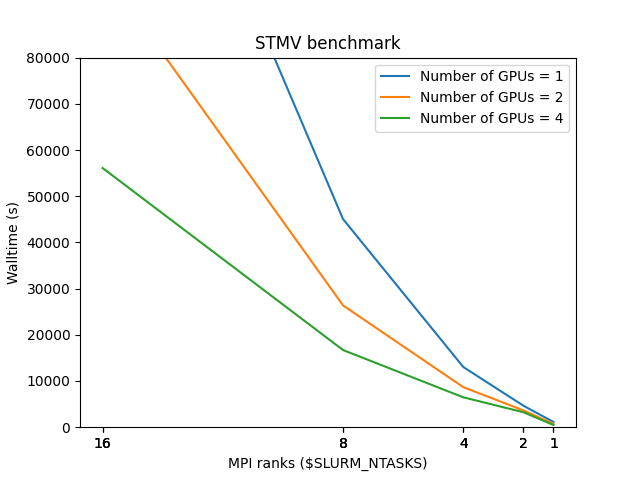
Numerical values for the benchmark (ns/day) are as follows:
| GPU/MPI | 1 | 2 | 4 | 8 | 16 |
|---|---|---|---|---|---|
| 1 | 1136 | 4652 | 13031 | 45043 | |
| 2 | 712 | 3635 | 8673 | 26355 | 99093 |
| 4 | 477 | 3241 | 6471 | 16703 | 56104 |
Info
Remaining combinations of MPI/OMP were not feasible due to memory limit on the GPUs.
Thus, users are advised to choose the MPI/GPU combination that fits their system size:
the table above shows the highest raw throughput for 2 GPUs with 16 MPI ranks,
whereas a single MPI rank is most cost-effective in BUs for small systems.
It is important to understand that if a user requests one MPI rank (#SBATCH --ntasks-per-node=1) and,
for example, 32 CPUs (#SBATCH --cpus-per-task=32) he/she will be charged 32 BUs.
This should be taken into account when requesting the number of GPUs (#SBATCH --gres=gpu:2),
since 16 CPUs per GPU is the recommended allocation on the accelerated nodes.
Generally speaking, the most cost-efficient combinations of requested resources, with respect to BUs, are as follows:
| #SBATCH --ntasks-per-node= | #SBATCH --cpus-per-task= | #SBATCH --gres=gpu: |
|---|---|---|
| 1 | 16 | 1 |
| 2 | 32 | 2 |
| 3 | 16 | 3 |
| 4 | 16 | 4 |
Example run script
You can copy and modify this script as namd_run.sh and submit a job to a compute node
with the command sbatch namd_run.sh.
#!/bin/bash
#SBATCH -J "namd_job"   # name of job in SLURM
#SBATCH --account=<project> # project number
#SBATCH --partition=gpu     # GPU partition (NAMD is GPU-aware only)
#SBATCH --nodes=1       # GPU allocation allows only a single node
#SBATCH --ntasks-per-node=  # number of mpi ranks per node
#SBATCH --cpus-per-task=    # number of cpus per mpi rank
#SBATCH --time=hh:mm:ss     # time limit for a job
#SBATCH -o stdout.%J.out    # standard output
#SBATCH -e stderr.%J.out    # error output

module load NAMD/2.14-foss-2021a-CUDA-11.3.1

# Modify according to specific needs
init_dir=`pwd`
work_dir=/work/$SLURM_JOB_ID

# Copy files over
input_files=""
output_files=""

# Move to working directory
mkdir -p $work_dir
cd $work_dir
cp $input_files $work_dir/.

# Start NAMD
mpiexec -np ${SLURM_NTASKS} charmrun +p ${SLURM_CPUS_PER_TASK} +isomalloc_sync +setcpuaffinity namd2 +devices 0 <input_file>  # adjust to the requested GPUs, e.g. +devices 0,1

# Move files back
cp $output_files $init_dir/.
GPU partition
NAMD is compiled only as a GPU-aware version and must be run on the gpu partition.
GPU IDs
The DEVICES variable in the following script refers to the IDs of the GPUs, which
range from 0 to 3. Users are highly advised to hard-code the GPU IDs as plain text
in the command rather than passing a shell variable. If one wishes to perform
the calculation on 1 GPU this part of the command should look like
+devices 0```, for 2 GPUs use ```+devices 0,1, etc.