ORCA
Description
ORCA is an ab initio quantum chemistry program package that contains modern electronic structure methods including density functional theory, many-body perturbation, coupled cluster, multireference methods, and semi-empirical quantum chemistry methods. Its main field of application is larger molecules, transition metal complexes, and their spectroscopic properties. ORCA is developed in the research group of Frank Neese. The free version is available only for academic use at academic institutions.
User guide
You can find the software documentation and user guide here. To download the .pdf manual you should register at the community forum.
Versions
The following versions of ORCA are currently available:
- Runtime dependencies:
- None, required libraries and dependencies are loaded automatically with the
ORCA/5.0.4-OpenMPI-4.1.4module.
- None, required libraries and dependencies are loaded automatically with the
You can load the ORCA module with the following command:
module load ORCA/5.0.4-OpenMPI-4.1.4
- Runtime dependencies:
- None, required libraries and dependencies are loaded automatically with the
ORCA/6.0.0-OpenMPI-4.1.6module.
- None, required libraries and dependencies are loaded automatically with the
You can load the ORCA module with the following command:
module load ORCA/6.0.0-OpenMPI-4.1.6
- Runtime dependencies:
- None, required libraries and dependencies are loaded automatically with the
ORCA/6.0.1-OpenMPI-4.1.6module.
- None, required libraries and dependencies are loaded automatically with the
You can load the ORCA module with the following command:
module load ORCA/6.0.1-OpenMPI-4.1.6
Benchmarking ORCA
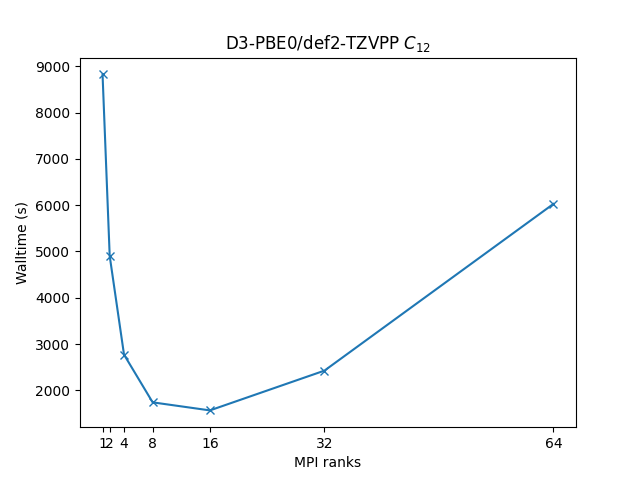
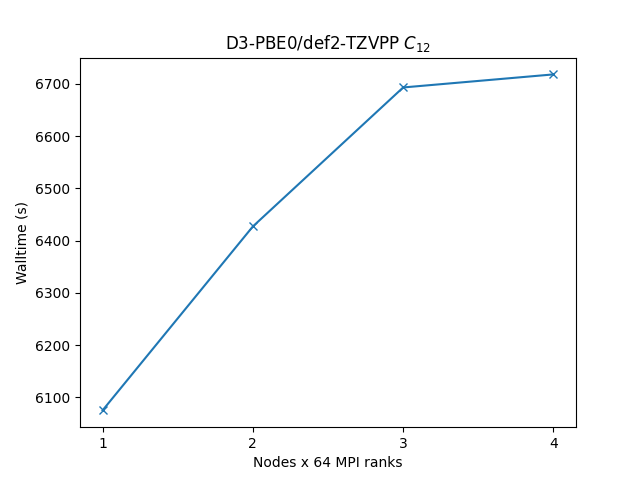
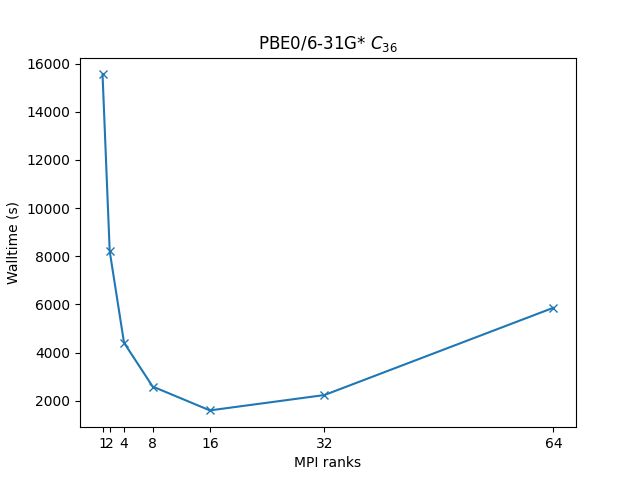
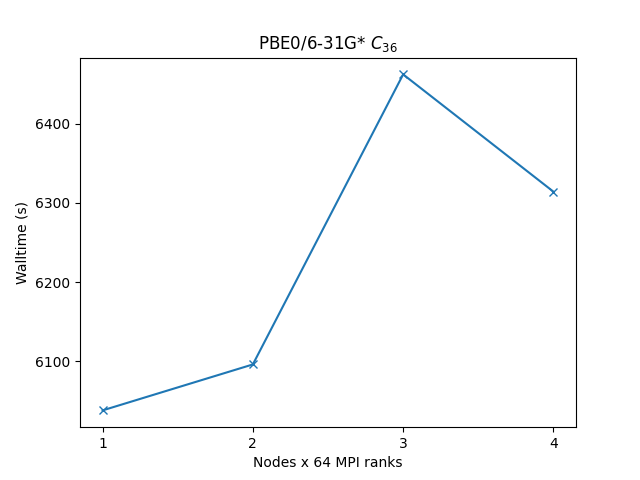
In order to better understand how ORCA utilises the available hardware on Devana and how to get good performance we can examine the effect on benchmark performance of the choice of the number of MPI ranks per node.
Following command has been used to run the benchmarks:
/storage-apps/easybuild/software/ORCA/5.0.4-OpenMPI-4.1.4/orca ${benchmark}.inp > ${benchmark}.out
Info
Single-node benchmarks have been run on local /work/ storage native to each compute node, which are generally faster than shared storage hosting /project and /scratch directories.
Benchmarks have been made on following systems:
Geometry optimization of C12 benzene dimer at the D3-PBE0/def2-TZVPP level of theory illustrating the most time-consuming part of the calculation, i.e. SCF calculations.
c12-pbe0-d30-tzvpp.inp
! D3ZERO PBE0 def2-TZVPP Opt
%pal
nprocs n
end

*xyz 0 1
C    -0.062619375461      0.000000000000     -2.001649629456
C    -1.218688068356     -0.354690359108     -1.303485629456
C     1.093449317434      0.354690359108     -1.303485629456
H    -2.118113174883     -0.630640582469     -1.846658629456
H     1.992874423961      0.630640582469     -1.846658629456
C    -1.218688068356     -0.354690359108      0.092844370544
C     1.093449317434      0.354690359108      0.092844370544
H    -2.118113174883     -0.630640582469      0.636017370544
H     1.992874423961      0.630640582469      0.636017370544
C    -0.062619375461      0.000000000000      0.791008370544
H    -0.062619375461      0.000000000000      1.877355370544
H    -0.062619375461      0.000000000000     -3.087996629456
C    -0.264430744069     -3.762741758810     -2.205619137167
C    -1.420499436964     -4.117432117918     -1.507455137167
C     0.891637948826     -3.408051399702     -1.507455137167
H    -2.319924543491     -4.393382341279     -2.050628137167
H     1.791063055353     -3.132101176340     -2.050628137167
C    -1.420499436964     -4.117432117918     -0.111125137167
C     0.891637948826     -3.408051399702     -0.111125137167
H    -2.319924543491     -4.393382341279      0.432047862833
H     1.791063055353     -3.132101176340      0.432047862833
C    -0.264430744069     -3.762741758810      0.587038862833
H    -0.264430744069     -3.762741758810      1.673385862833
H    -0.264430744069     -3.762741758810     -3.291966137167
*
| Single node Performance | Cross-node Performance |
|---|---|
 |
 |
Geometry optimization of C36 fullerene at PBE0/6-31G* level of theory illustrating the most time-consuming part of the calculation, i.e. SCF calculations.
c36-pbe0-631gs.inp
! PBE0 6-31G* Opt
%pal
nprocs n
end
# B3LYP is here the method (DFT functional), def2-SVP the basis set and Opt is the jobtype (geometry optimization).
# Order of the keywords is not important.

*xyz 0 1
 C    -1.52700   1.76820   1.10880
 C    -2.36070   0.72480   1.26750
 C    -1.67820  -2.27640   0.13880
 C    -2.49780  -1.40820   0.80110
 C    -1.83200  -0.49960   1.65300
 C    -0.21160   1.77830   1.49380
 C     1.81570   0.46710   1.62050
 C     0.41900   0.58540   1.96880
 C    -0.43190  -0.62020   1.97940
 C     0.19450  -1.81880   1.50120
 C    -0.43300  -2.60020   0.52680
 C     1.65110   2.23630   0.12250
 C     0.41060   2.54900   0.51060
 C     2.48860   1.37490   0.76110
 C     2.35930  -0.75560   1.27290
 C     1.51570  -1.79100   1.12690
 C    -3.17430  -0.63550  -0.13640
 C    -1.52890  -1.78030  -1.13340
 C    -2.35450  -0.73210  -1.24830
 C    -3.18670   0.66160   0.15930
 C    -2.52400   1.42430  -0.78300
 C    -0.45510   2.61090  -0.56090
 C    -1.70130   2.31610  -0.15420
 C     0.44340  -2.60890  -0.54250
 C    -0.20120  -1.80680  -1.49020
 C     0.42820  -0.58870  -1.92240
 C    -0.42340   0.62590  -1.94160
 C    -1.82920   0.50110  -1.60990
 C     0.22010   1.84690  -1.52860
 C     1.69120  -2.30340  -0.14430
 C     2.51320  -1.39870  -0.74120
 C     1.83550  -0.46390  -1.58540
 C     3.20040  -0.63110   0.17580
 C     3.20210   0.65420  -0.17840
 C     2.40480   0.77950  -1.29880
 C     1.55490   1.81710  -1.18780
*
| Single node Performance | Cross-node Performance |
|---|---|
 |
 |
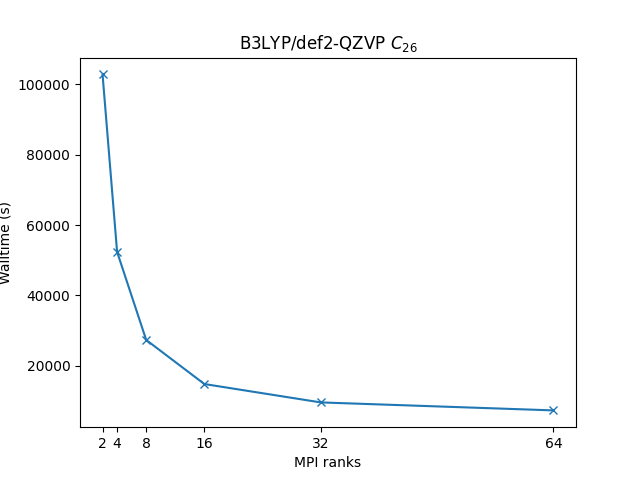
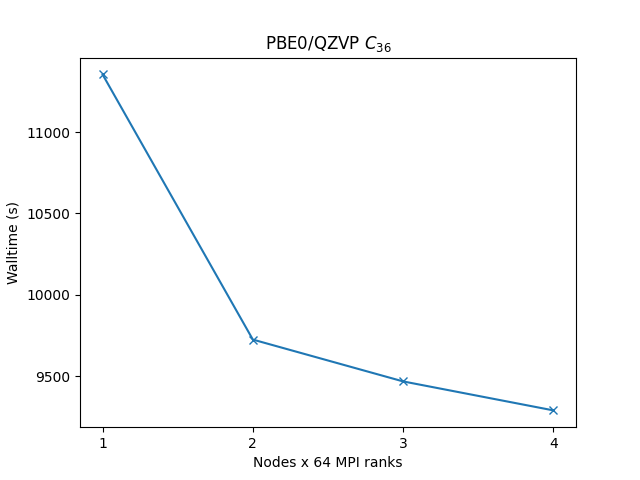
Geometry optimization of C36 fullerene at PBE0/def2-QZVP* level of theory illustrating the most time-consuming part of the calculation, i.e. SCF calculations.
c36-qzvp.inp
! B3LYP def2-QZVP Opt
%pal
nprocs n
end
# B3LYP is here the method (DFT functional), def2-SVP the basis set and Opt is the jobtype (geometry optimization).
# Order of the keywords is not important.

*xyz 0 1
 C    -1.52700   1.76820   1.10880
 C    -2.36070   0.72480   1.26750
 C    -1.67820  -2.27640   0.13880
 C    -2.49780  -1.40820   0.80110
 C    -1.83200  -0.49960   1.65300
 C    -0.21160   1.77830   1.49380
 C     1.81570   0.46710   1.62050
 C     0.41900   0.58540   1.96880
 C    -0.43190  -0.62020   1.97940
 C     0.19450  -1.81880   1.50120
 C    -0.43300  -2.60020   0.52680
 C     1.65110   2.23630   0.12250
 C     0.41060   2.54900   0.51060
 C     2.48860   1.37490   0.76110
 C     2.35930  -0.75560   1.27290
 C     1.51570  -1.79100   1.12690
 C    -3.17430  -0.63550  -0.13640
 C    -1.52890  -1.78030  -1.13340
 C    -2.35450  -0.73210  -1.24830
 C    -3.18670   0.66160   0.15930
 C    -2.52400   1.42430  -0.78300
 C    -0.45510   2.61090  -0.56090
 C    -1.70130   2.31610  -0.15420
 C     0.44340  -2.60890  -0.54250
 C    -0.20120  -1.80680  -1.49020
 C     0.42820  -0.58870  -1.92240
 C    -0.42340   0.62590  -1.94160
 C    -1.82920   0.50110  -1.60990
 C     0.22010   1.84690  -1.52860
 C     1.69120  -2.30340  -0.14430
 C     2.51320  -1.39870  -0.74120
 C     1.83550  -0.46390  -1.58540
 C     3.20040  -0.63110   0.17580
 C     3.20210   0.65420  -0.17840
 C     2.40480   0.77950  -1.29880
 C     1.55490   1.81710  -1.18780
*
| Single node Performance | Cross-node Performance |
|---|---|
 |
 |
Example run script
Disks
For the best performance use local storage /work for single-node calculations; for cross-node calculations use a shared filesystem (e.g. /scratch) or replicate the input files to /work on every node.
MPI ranks
In case of a parallel run, use the nprocs option inside the %pal block instead of the %palN directive in the input file.
%pal
nprocs ${MPI ranks}
end
You can copy and modify this script as orca_run.sh and submit a job to a compute node with the command sbatch orca_run.sh.
#!/bin/bash
#SBATCH -J "orca_job"       # name of job in SLURM
#SBATCH --account=<project> # project number
#SBATCH --partition=        # selected partition (short, medium, long)
#SBATCH --ntasks=       # number of mpi ranks (parallel run)
#SBATCH --time=hh:mm:ss     # time limit for a job
#SBATCH -o stdout.%J.out    # standard output
#SBATCH -e stderr.%J.out    # error output

# module load ORCA/5.0.4-OpenMPI-4.1.4 # For ORCA 5.0.4 (no longer available)
module load ORCA/6.0.0-OpenMPI-4.1.6 # For ORCA 6.0.0

INIT_DIR=`pwd`
SCRATCH=/work/$SLURM_JOB_ID

mkdir $SCRATCH

INPUT=orca_input.inp
OUTPUT=orca_output.out

cp $INPUT $SCRATCH/$INPUT

cd $SCRATCH

# If you wish to run ORCA in parallel, you should use complete path to the binary.
# /storage-apps/easybuild/software/ORCA/5.0.4-OpenMPI-4.1.4/orca $INPUT > $INIT_DIR/$OUTPUT # For ORCA 5.0.4
mpiexec -np $SLURM_NTASKS /storage-apps/software/orca/orca_6_0_0_shared_openmpi416_avx2/orca $INPUT > $INIT_DIR/$OUTPUT # For ORCA 6.0.0