NWChem
Description
NWChem aims to provide its users with computational chemistry tools that are scalable both in their ability to treat large scientific computational chemistry problems efficiently, and in their use of available parallel computing resources from high-performance parallel supercomputers to conventional workstation clusters. NWChem software can handle: biomolecules, nanostructures, and solid-state; from quantum to classical, and all combinations; Gaussian basis functions or plane-waves; scaling from one to thousands of processors; properties and relativity.
User guide
You can find the software documentation and user guide here.
Available Versions
The following versions of NWChem are currently available:
- Runtime dependencies:
- None, required libraries and dependencies are loaded automatically with the
NWChem/7.0.2-intel-2022amodule.
- None, required libraries and dependencies are loaded automatically with the
You can load the NWChem module with the following command:
module load NWChem/7.0.2-intel-2022a
Benchmarking NWChem
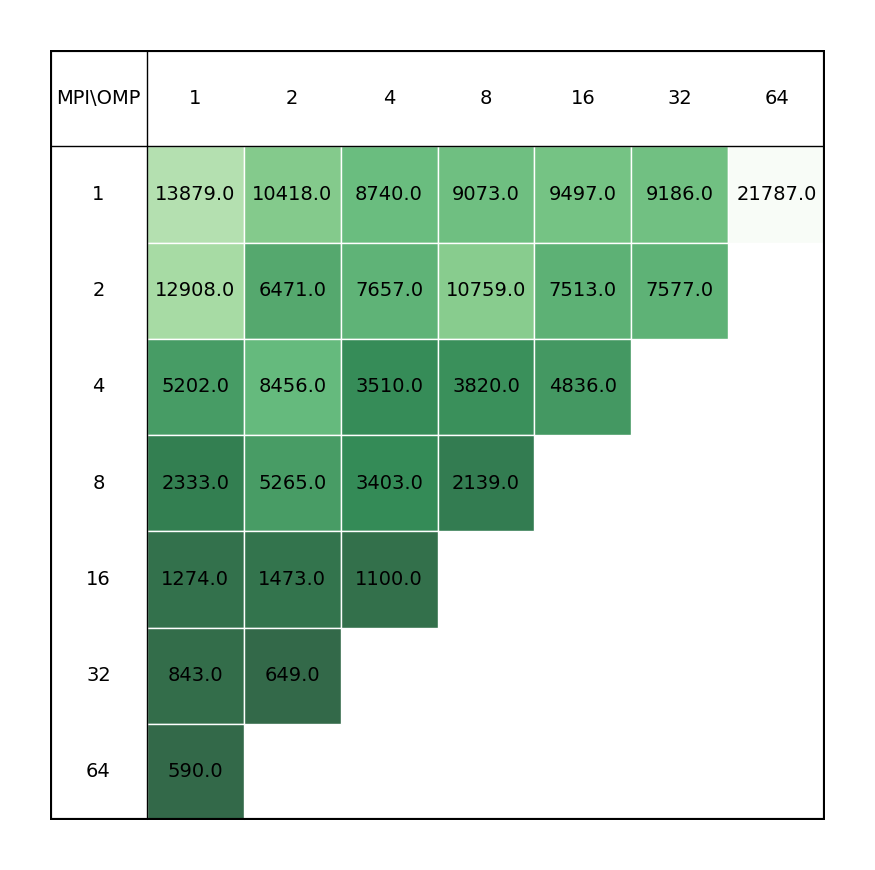
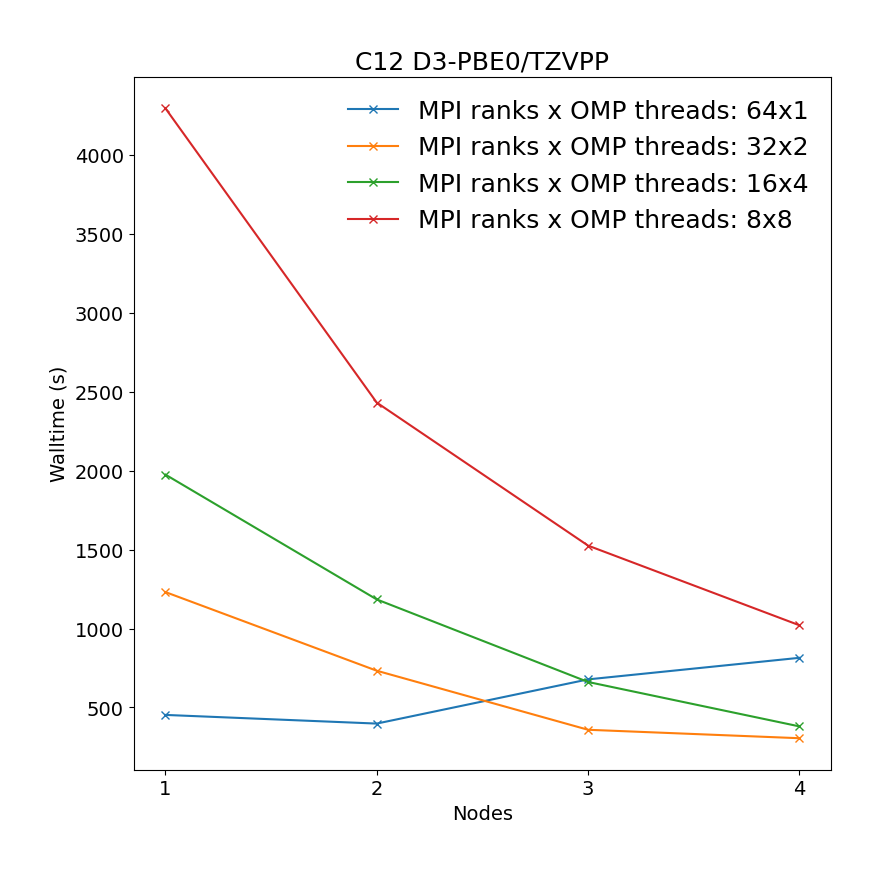
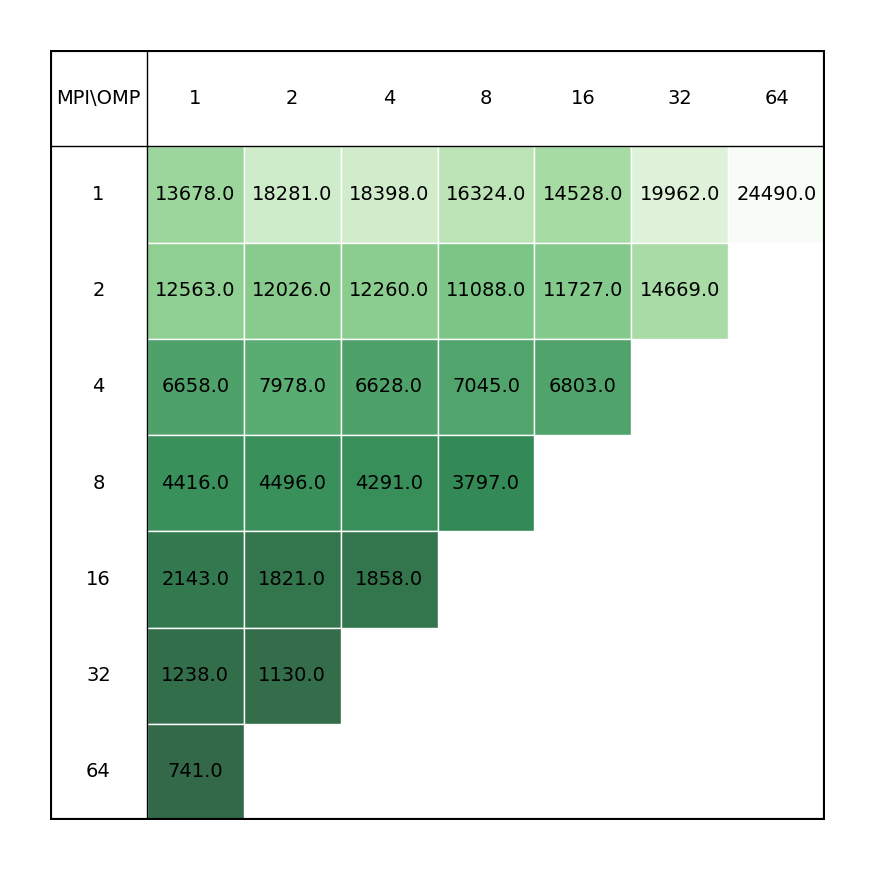
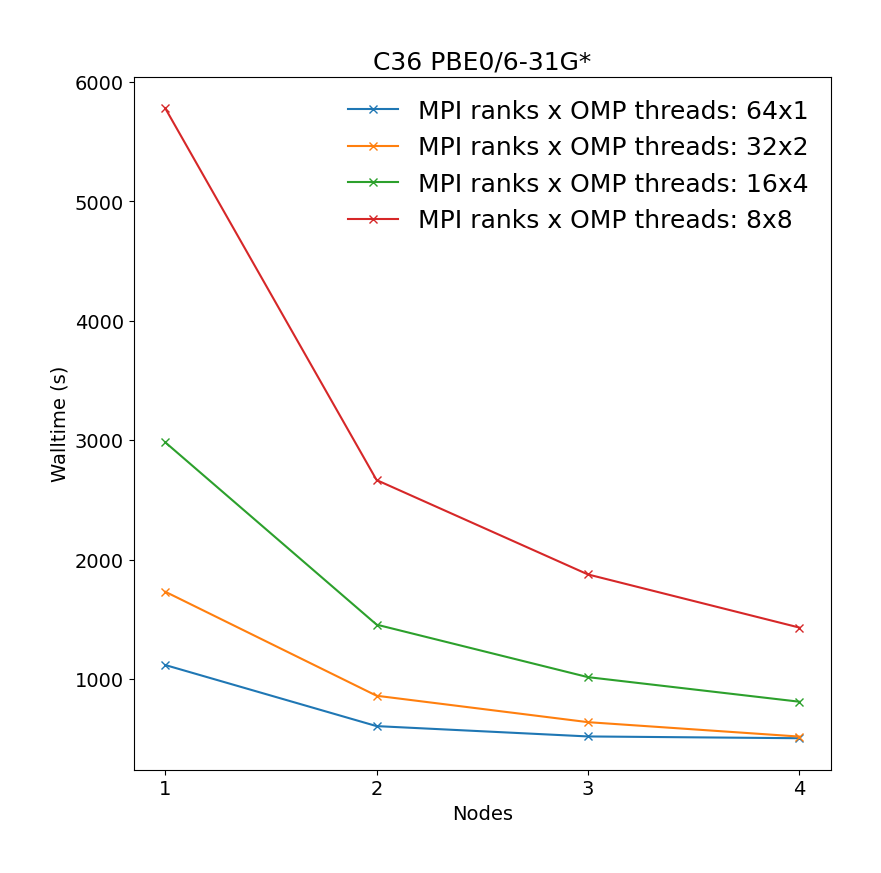
In order to better understand how NWChem utilises the available hardware on Devana and how to get good performance we can examine the effect on benchmark performance of the choice of the number of MPI ranks per node and OpenMP thread. For more information about these benchmark systems see the following NWChem benchmarks.
The following command has been used to run the benchmarks:
    export OMP_NUM_THREADS=$nompt
    mpiexec -np $ntmpi nwchem $input.inp > $output.out
Benchmarks have been made on the following systems:
Geometry optimization of C12 benzene dimer at D3-PBE0/def2-TZVPP level of theory illustrating the most time-consuming part of the calculation, i.e. SCF calculations.
c12-pbe0-d30-tzvpp.nw
title "c12"

echo
start c12-d4-pbe0-tzvpp_dat

#scratch_dir /scratch

memory stack 2000 mb heap 200 mb global 2000 mb noverify

geometry units angstrom noautoz
#  symmetry c1
C    -0.062619375461      0.000000000000     -2.001649629456
C    -1.218688068356     -0.354690359108     -1.303485629456
C     1.093449317434      0.354690359108     -1.303485629456
H    -2.118113174883     -0.630640582469     -1.846658629456
H     1.992874423961      0.630640582469     -1.846658629456
C    -1.218688068356     -0.354690359108      0.092844370544
C     1.093449317434      0.354690359108      0.092844370544
H    -2.118113174883     -0.630640582469      0.636017370544
H     1.992874423961      0.630640582469      0.636017370544
C    -0.062619375461      0.000000000000      0.791008370544
H    -0.062619375461      0.000000000000      1.877355370544
H    -0.062619375461      0.000000000000     -3.087996629456
C    -0.264430744069     -3.762741758810     -2.205619137167
C    -1.420499436964     -4.117432117918     -1.507455137167
C     0.891637948826     -3.408051399702     -1.507455137167
H    -2.319924543491     -4.393382341279     -2.050628137167
H     1.791063055353     -3.132101176340     -2.050628137167
C    -1.420499436964     -4.117432117918     -0.111125137167
C     0.891637948826     -3.408051399702     -0.111125137167
H    -2.319924543491     -4.393382341279      0.432047862833
H     1.791063055353     -3.132101176340      0.432047862833
C    -0.264430744069     -3.762741758810      0.587038862833
H    -0.264430744069     -3.762741758810      1.673385862833
H    -0.264430744069     -3.762741758810     -3.291966137167
end

BASIS cartesian
 * library def2-tzvpp
END

dft
 direct
 xc pbe0
 disp vdw 3
# convergence energy 1e-3 density 1e-3 gradient 1e-3
 iterations 500
#smear
#convergence damp 45 ncydp 0 dampon 1d99 dampoff 1d-4
noprint "final vectors analysis" multipole inertia
end
#set quickguess t
set dft:pstat t
set dft:staticguess t
task dft optimize
| Single node Performance | Cross-node Performance |
|---|---|
 |
 |
Geometry optimization of C36 fullerene at PBE0/6-31G* level of theory illustrating the most time-consuming part of the calculation, i.e. SCF calculations.
c36-pbe0-631gs.nw
```bash title "c36"
echo
start c36-631gs_dat

#scratch_dir /scratch

memory stack 2000 mb heap 200 mb global 2000 mb noverify

geometry units angstrom noautoz
#  symmetry c1
 C    -1.52700   1.76820   1.10880
 C    -2.36070   0.72480   1.26750
 C    -1.67820  -2.27640   0.13880
 C    -2.49780  -1.40820   0.80110
 C    -1.83200  -0.49960   1.65300
 C    -0.21160   1.77830   1.49380
 C     1.81570   0.46710   1.62050
 C     0.41900   0.58540   1.96880
 C    -0.43190  -0.62020   1.97940
 C     0.19450  -1.81880   1.50120
 C    -0.43300  -2.60020   0.52680
 C     1.65110   2.23630   0.12250
 C     0.41060   2.54900   0.51060
 C     2.48860   1.37490   0.76110
 C     2.35930  -0.75560   1.27290
 C     1.51570  -1.79100   1.12690
 C    -3.17430  -0.63550  -0.13640
 C    -1.52890  -1.78030  -1.13340
 C    -2.35450  -0.73210  -1.24830
 C    -3.18670   0.66160   0.15930
 C    -2.52400   1.42430  -0.78300
 C    -0.45510   2.61090  -0.56090
 C    -1.70130   2.31610  -0.15420
 C     0.44340  -2.60890  -0.54250
 C    -0.20120  -1.80680  -1.49020
 C     0.42820  -0.58870  -1.92240
 C    -0.42340   0.62590  -1.94160
 C    -1.82920   0.50110  -1.60990
 C     0.22010   1.84690  -1.52860
 C     1.69120  -2.30340  -0.14430
 C     2.51320  -1.39870  -0.74120
 C     1.83550  -0.46390  -1.58540
 C     3.20040  -0.63110   0.17580
 C     3.20210   0.65420  -0.17840
 C     2.40480   0.77950  -1.29880
 C     1.55490   1.81710  -1.18780
end

BASIS cartesian
 C library 6-31g*
END

dft
 xc b3lyp
# convergence energy 1e-3 density 1e-3 gradient 1e-3
 iterations 500
#smear
#convergence damp 45 ncydp 0 dampon 1d99 dampoff 1d-4
noprint "final vectors analysis" multipole inertia
end
#set quickguess t
set dft:pstat t
set dft:staticguess t
task dft optimize
```
| Single node Performance | Cross-node Performance |
|---|---|
 |
 |
Example run script
You can copy and modify this script as nwchem_run.sh and submit a job to a compute node with the command sbatch nwchem_run.sh.
#!/bin/bash
#SBATCH -J "nwchem_job"     # name of job in SLURM
#SBATCH --account=<project> # project number
#SBATCH --partition=        # selected partition (short, medium, long)
#SBATCH --nodes=        # number of nodes
#SBATCH --ntasks=       # number of mpi ranks (parallel run)
#SBATCH --time=hh:mm:ss     # time limit for a job
#SBATCH -o stdout.%J.out    # standard output
#SBATCH -e stderr.%J.out    # error output

module load NWChem/7.0.2-intel-2022a

mkdir -p /scratch/$SLURM_JOB_ACCOUNT/$SLURM_JOB_ID

export NWCHEM_SCRATCH_DIR=/scratch/$SLURM_JOB_ACCOUNT/$SLURM_JOB_ID
export NWCHEM_PERMANENT_DIR=/scratch/$SLURM_JOB_ACCOUNT

INPUT=nwchem_input.inp
OUTPUT=nwchem_output.out

mpiexec -np $SLURM_NTASKS nwchem $INPUT > $OUTPUT # You can specify exact input and output name