LAMMPS
Description
LAMMPS (Large-scale Atomic/Molecular Massively Parallel Simulator) is a classical molecular dynamics code with a focus on materials modeling. LAMMPS has potentials for solid-state materials (metals, semiconductors) and soft matter (biomolecules, polymers) and coarse-grained or mesoscopic systems. It can be used to model atoms or, more generically, as a parallel particle simulator at the atomic, meso, or continuum scale.
Available Versions
- Runtime dependencies:
- None, required libraries and dependencies are loaded automatically with the
LAMMPS/23Jun2022-foss-2021b-kokkos-CUDA-11.4.1module.
- None, required libraries and dependencies are loaded automatically with the
You can load the LAMMPS module with the following command:
module load LAMMPS/23Jun2022-foss-2021b-kokkos-CUDA-11.4.1
User guide
You can find the software documentation and user guide on the official LAMMPS website.
Optional Packages
Packages are groups of files that enable a specific set of features and extend LAMMPS functionality, such as force fields for molecular systems or rigid-body constraints, etc. These packages must be included as part of the LAMMPS build process. The list and description of all packages can be found on the official LAMMPS website, section Package details.
Optional Packages
The current LAMMPS version includes only the KOKKOS package. If you wish to have other packages included, send a request to our administration support team.
Benchmarking LAMMPS
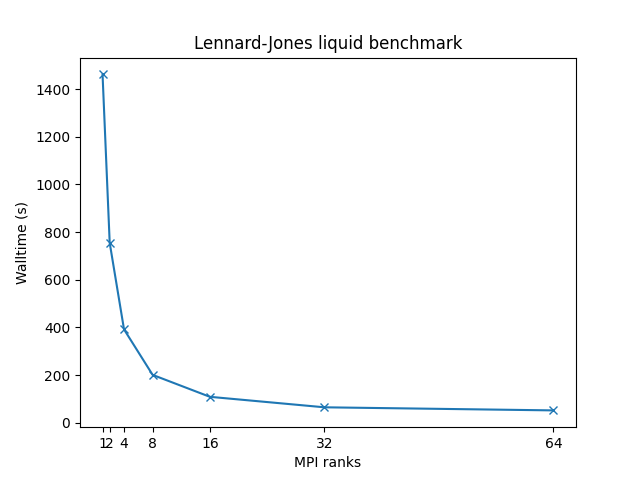
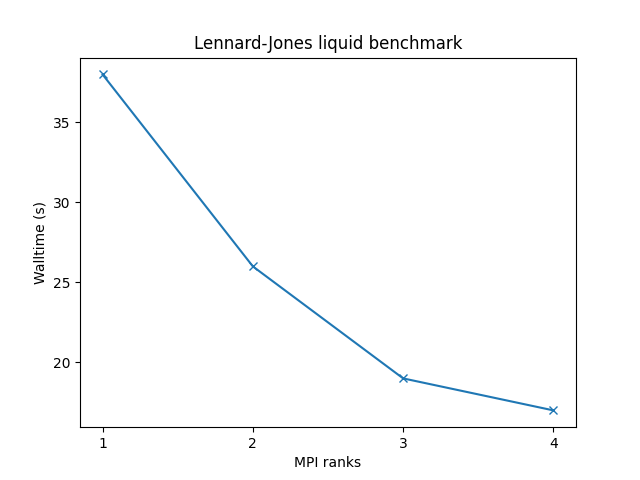
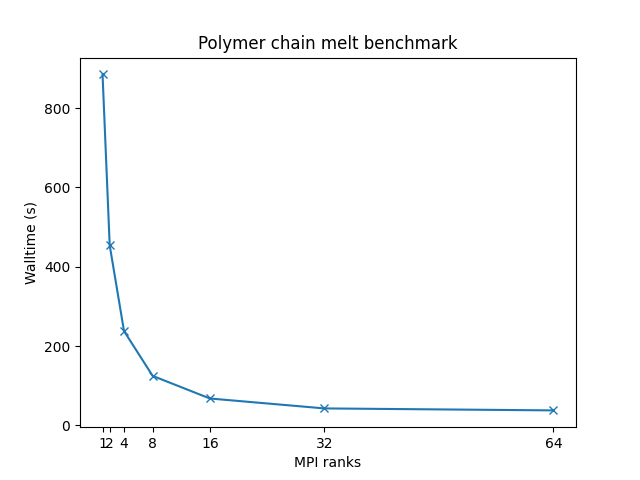
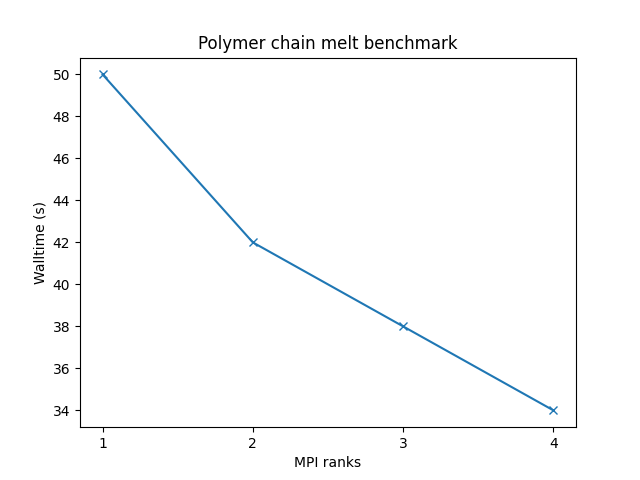
In order to better understand how LAMMPS utilizes the available hardware on Devana and how to get good performance we can examine the effect on benchmark performance of the choice of the number of MPI ranks per node.
The following command has been used to run the benchmarks:
mpiexec -np $SLURM_NTASKS lmp -in ${benchmark}.inp > ${benchmark}.out
Info
Single-node benchmarks have been run on local /work/ storage native to each compute node, which is generally faster than the shared storage hosting /project/ and /scratch/ directories.
OPENMP package
Current version of LAMMPS is compiled without the OpenMP package
that provides optimized and multi-threaded versions of many pair styles, nearly all bonded styles
(bond, angle, dihedral, improper), several Kspace styles, and a few fix styles. Thus, the best performance
can be achieved with the maximum number of MPI ranks, each running on a single OMP thread: export OMP_NUM_THREADS=1.
Benchmarks have been made on the following systems:
 - 32,000 atoms for 100000 timesteps
 - reduced density = 0.8442 (liquid)
 - force cutoff = 2.5 sigma
 - neighbor skin = 0.3 sigma
 - neighbors/atom = 55 (within force cutoff)
 - NVE time integration
| Single node Performance | Cross-node Performance |
|---|---|
 |
 |
Bead-spring polymer melt with 100-mer chains and FENE bonds:
 - 32,000 atoms for 100000 timesteps
 - reduced density = 0.8442 (liquid)
 - force cutoff = 2^(1/6) sigma
 - neighbor skin = 0.4 sigma
 - neighbors/atom = 5 (within force cutoff)
 - NVE time integration
| Single node Performance | Cross-node Performance |
|---|---|
 |
 |
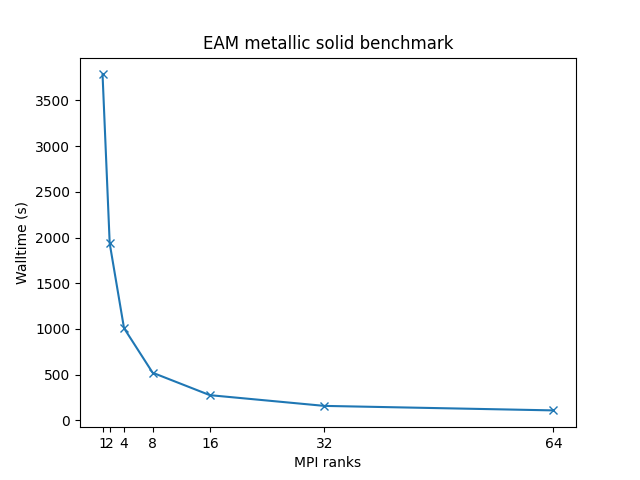
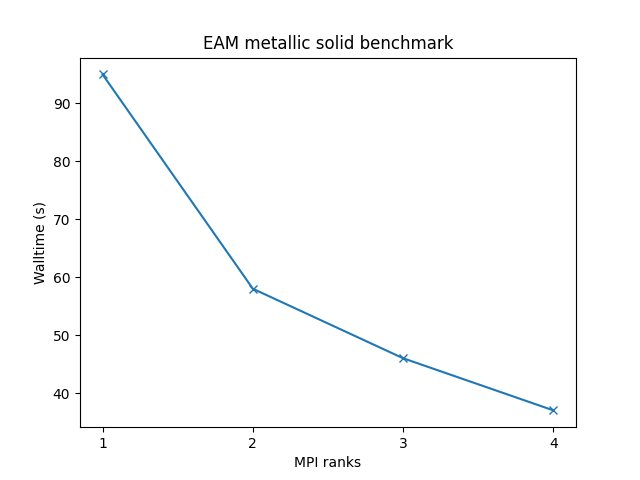
Cu metallic solid with embedded atom method (EAM) potential:
 - 32,000 atoms for 100000 timesteps
 - force cutoff = 4.95 sigma
 - neighbor skin = 1.0 sigma
 - neighbors/atom = 45 (within force cutoff)
 - NVE time integration
| Single node Performance | Cross-node Performance |
|---|---|
 |
 |
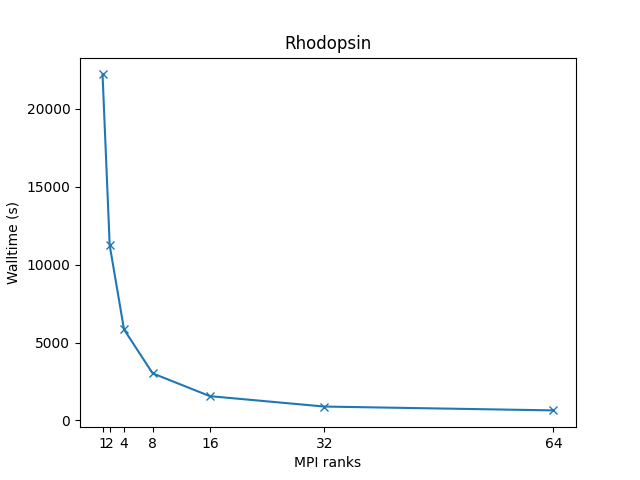
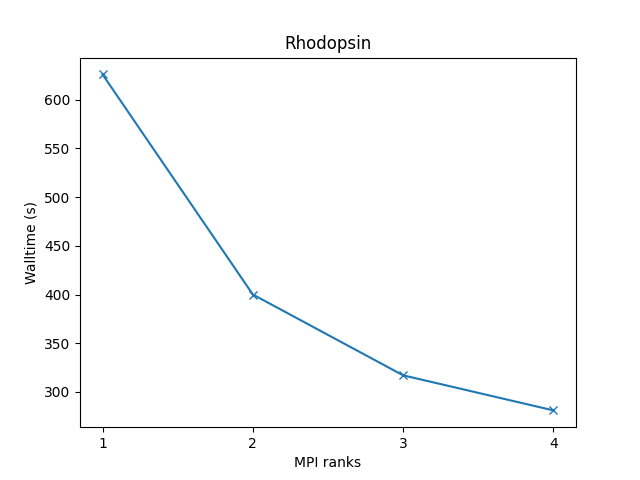
All-atom rhodopsin protein in solvated lipid bilayer with CHARMM force field, long-range Coulomb interactions via PPPM (particle-particle particle-mesh), SHAKE constraints:
 - 32,000 atoms for 100000 timesteps
 - LJ force cutoff = 10 A
 - neighbor skin = 1.0 sigma
 - neighbors/atom = 440 (within force cutoff)
 - NPT time integration
| Single node Performance | Cross-node Performance |
|---|---|
 |
 |
More information about these benchmarks, and many more examples, can be found on the official LAMMPS benchmarks page.
Example run script
You can copy and modify this script, save it as lammps_run.sh, and submit the job to a compute node with the command sbatch lammps_run.sh.
#!/bin/bash
#SBATCH -J "LAMMPS_job"     # name of job in SLURM
#SBATCH --account=<project> # project number
#SBATCH --partition=        # select short, medium, long
#SBATCH --nodes=        # number of nodes
#SBATCH --ntasks=       # number of mpi ranks
#SBATCH --time=hh:mm:ss     # time limit for a job
#SBATCH -o stdout.%J.out    # standard output
#SBATCH -e stderr.%J.out    # error output

module load LAMMPS/23Jun2022-foss-2021b-kokkos-CUDA-11.4.1

# Modify according to specific needs
init_dir=`pwd`
work_dir=/scratch/$SLURM_JOB_ACCOUNT/$SLURM_JOB_ID

# Copy files over
input_files=""
output_files=""

# Define input file
input=""

# Move to working directory
mkdir -p "$work_dir"
cd $work_dir
cp $input_files $work_dir/.

# Start LAMMPS
export OMP_NUM_THREADS=1
mpiexec -np ${SLURM_NTASKS} lmp -in ${input}.inp

# Move files back
cp $output_files $init_dir/.