Storage Overview
Effective data management is essential for maintaining high performance and productivity when working on the Perun HPC cluster. This guide provides an overview of the available storage systems, their intended use cases, and general recommendations for optimal usage.
Backup Policy
Backup is not guaranteed across all filesystems.
/homeis backed up daily./projectis backed up only for active projects monthly./scratchand/workhave no backup.
Users are responsible for ensuring that important data is stored in appropriate locations.
For detailed information about storage quotas, see the Storage Quotas guide.
Storage Systems
After logging into the Perun cluster, several storage locations are available. Each filesystem is designed for a specific part of the computational workflow.
Overview of Available Filesystems on Perun
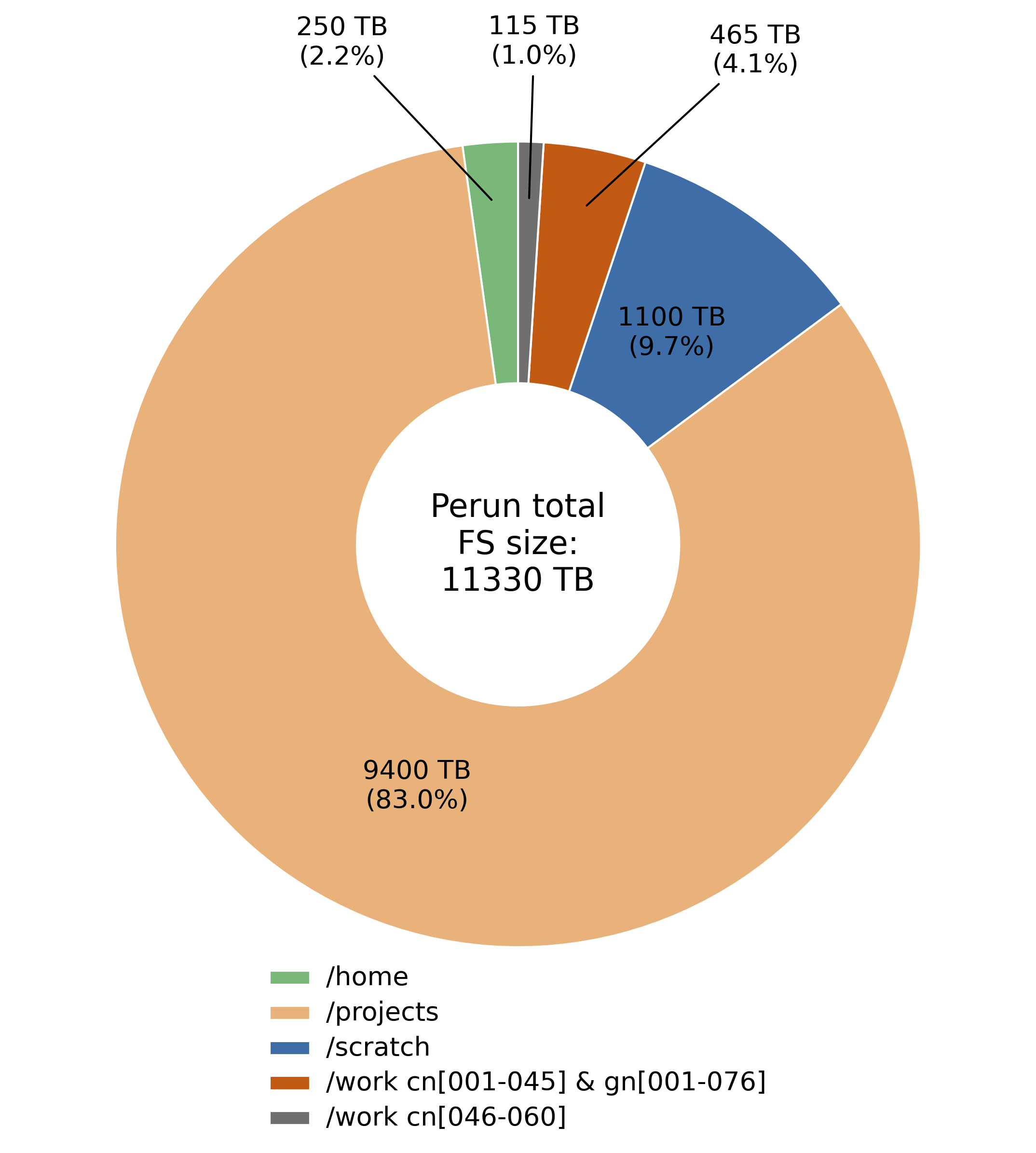
-
/home
- Personal directory unique to each user.
- Intended for scripts, configuration files, and smaller datasets.
-
/project
- Shared directory accessible to all project members.
- Used for storing project-related data and results.
- Includes quotas per project.
-
/scratch
- High-performance parallel filesystem.
- Designed for large datasets and I/O-intensive workloads.
-
/work
- Local storage on compute nodes.
- Provides the highest I/O performance.
- Accessible only during an active job.
Where to Run Calculations?
| Mountpoint | Capacity | Accessible From | Performance (Write/Read) |
|---|---|---|---|
/home/username |
250 TB | Login & Compute Nodes | 3 GB/s & 6 GB/s |
/project/project_id |
9.4 PB | Login & Compute Nodes | 120 GB/s & 170 GB/s |
/scratch/project_id |
1.1 PB | Login & Compute Nodes | 240 GB/s & 350 GB/s |
/work/SLURM_JOB_ID |
3.84–7.68 TB | Compute Nodes | up to ~5–7 GB/s |
Choosing the Right Filesystem
The optimal filesystem depends on workload size, I/O patterns, and storage requirements. In general, /work provides the highest performance when the available local capacity is sufficient.
Where to Store Data?
Storage locations are categorized according to their intended purpose.
| Path (Mountpoint) | Quota | Retention | Protocol |
|---|---|---|---|
/home/username/ |
None | None | NFS |
Details
Personal home directory for each user. This location should be used primarily for scripts, configuration files, and smaller datasets.
The path can be verified using:
echo $HOME
| Path (Mountpoint) | Quota | Retention | Protocol |
|---|---|---|---|
/project/<project_id> |
Defined per project | 6 months after the project conclusion | LUSTRE |
Details
Shared directory accessible to all members of a project.
- Intended for shared project data, intermediate results, and final outputs.
- Backed up only for active projects.
- May include dedicated database directories.
| Path (Mountpoint) | Quota | Retention | Protocol |
|---|---|---|---|
/scratch/<project_id> |
Defined per project | Periodically purged | Parallel FS |
Details
Temporary storage intended for computational workloads.
- Designed for large datasets and high-throughput I/O.
- No backup — data should be considered non-persistent.
- Accessible from all compute nodes.
- Suitable for database-oriented workloads.
| Path (Mountpoint) | Quota | Retention | Protocol |
|---|---|---|---|
/work/$SLURM_JOB_ID |
Unlimited | Deleted after job completion | XFS |
Details
Local node storage available only during the execution of a job.
- Highest I/O performance available on the system.
- Suitable for workloads fitting within node-local capacity.
- Data is automatically removed after job completion.
Detailed quota information is available in the Storage Quotas guide.
Home
| Mountpoint | Per-User Limit | Backup | Total Capacity | Performance | Protocol |
|---|---|---|---|---|---|
/home |
None | Yes | 250 TB | 3/6 GB/s | NFS |
The /home directory is the default storage location after login and contains the personal directory for each user.
Projects
| Mountpoint | Per-User Limit | Backup | Total Capacity | Performance | Protocol |
|---|---|---|---|---|---|
/project |
Defined per project | Active only | 9.4 PB | 120/170 GB/s | LUSTRE |
Each user is assigned one or more project IDs, which are required for accessing project-related storage and computational resources. You can find your project ID(s) using:
id
id output
uid=187000000(user) gid=187000000(user) groups=187000000(user),187000062(p70-23-t),187000064(p81-23-t)
Project directories follow the structure:
/project/<project_id>
Data Retention Policy
Data in /project is preserved for 6 months after the project
concludes.
Scratch
| Mountpoint | Per-User Limit | Backup | Total Capacity | Performance | Protocol |
|---|---|---|---|---|---|
/scratch |
None | No | 1.1 PB | 240/350 GB/s | Parallel FS |
The /scratch directory provides high-performance temporary storage for
computational workloads.
Directory structure:
/scratch/<project_id>
Data Retention Policy
Data in /scratch is preserved for 6 months after the project
concludes.
Work
| Mountpoint | Per-User Limit | Backup | Total Capacity | Performance | Protocol |
|---|---|---|---|---|---|
/work |
None | No | 3.84–7.68 TB | up to ~5–7 GB/s | XFS |
The /work directory provides node-local storage with the highest performance.
This storage is available only during an active job and is intended for I/O-intensive workloads.
Details
- Data is automatically removed after job completion.
- Recommended for temporary high-performance computations.